GetRuntimeNodeInfosOnComponent
This feature has not been officially released yet. It is planned for KawaiiPhysics v1.22. Specifications may change during development.
Overview
When hair penetrates the body, appearance alone may not show whether to investigate the input pose, the simulated position, or collision size. Changing settings and replaying also makes it difficult to track the relationship between moving bones and configured collision shapes.
Runtime diagnostics return bone positions, radii, and collision shape information from the latest evaluation. Comparing input and evaluated positions provides evidence for investigating unexpected values. The feature does not identify the cause of penetration automatically.
The API returns diagnostic data; the caller implements overlays and recording UI such as the illustration below.
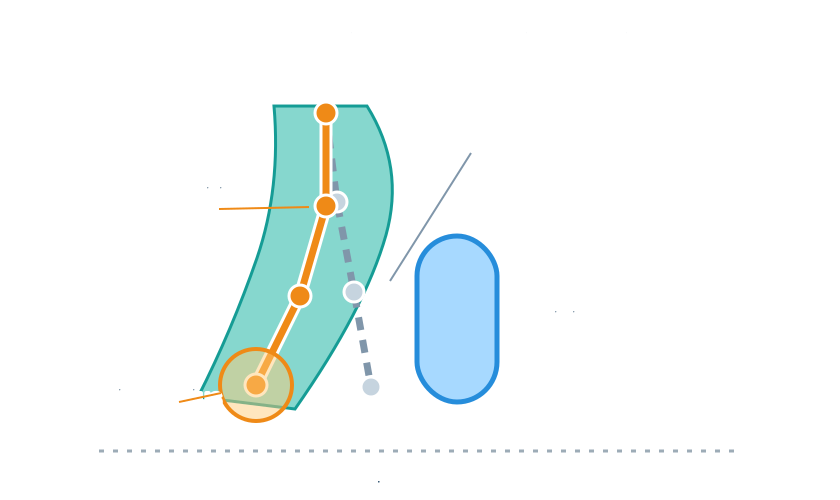
Calling GetRuntimeNodeInfosOnComponent
Call the function in the Blueprint Kawaii Physics category with MeshComp, FilterTags, and bFilterExactMatch. Outputs are OutInfos and OutError; the return value is the node count. The C++ declaration is:
static int32 GetRuntimeNodeInfosOnComponent(
    USkeletalMeshComponent* MeshComp,
    const FGameplayTagContainer& FilterTags,
    bool bFilterExactMatch,
    TArray<FKawaiiPhysicsRuntimeNodeInfo>& OutInfos,
    FString& OutError);
- Call on the GameThread after the target component has ticked, outside parallel animation evaluation. Placing it in the same Actor's Tick does not by itself guarantee this order.
- Empty
FilterTagsmatches all KawaiiPhysics nodes. The main, linked, and post-process AnimInstances are traversed. SetbFilterExactMatch = truewhen exact tag matching is needed. - If the return value is
-1, readOutError. Zero means no matching nodes; a positive return is the result-array size. The function clears both outputs on each call. - Check each result's
bEvaluatedbefore using positions.Bones/Limitspositions are meaningless when the node has not been evaluated.
bEvaluated indicates whether the latest evaluation transform cache is available; it is not a timestamp proving evaluation in the current frame.
Available fields
| Result | Main fields |
|---|---|
FKawaiiPhysicsRuntimeNodeInfo | AnimInstanceClassName, NodeIndex, RootBone, Tag, SimulationSpace, bEvaluated, SimulationToComponent |
Bones | Bone name, array Index/ParentIndex, post-physics Location, input PoseLocation, effective Radius, LengthRateFromRoot, bSkipSimulate |
Limits | Shape, source, original array name/index, driving bone, enabled state, position, rotation, dimensions |
Constraints | Connected bone indices/names and AnimNode/DataAsset/AutoDummy source |
Positions and dimensions are in component space, with distances in cm. Radii include temporary settings multipliers. When bNonUniformScale = true, radii and dimensions are approximations; avoid treating the diagnostic geometry as exact.
Dummy bones have no BoneName. DummyType distinguishes Tip, InterBone, and Bridge dummies. Parent and constraint indices refer to the Bones array, not skeleton bone indices. bSkipSimulate identifies bones pinned to the input pose, such as a chain root.
Collision Data Limitations
Use SourceArrayName/SourceIndex to trace a limit to its configuration. bEnabled describes use by the latest collision step, accounting for disabled settings and relevant dimensions. Capsule Start is its +Z end and End its -Z end; tapered capsules have Radius0/Radius1. Boxes expose half-size Extent, planes expose PlaneNormal, and inner spheres set bInnerSphere.
Convex shapes are excluded from Limits. NumConvexLimits reports the number of Simple World Collision convex limits, and ConvexFallbackShape identifies the fallback setting. A missing convex shape in a diagnostic drawing does not establish that it is absent from collision processing.
Related diagnostics
GetSimpleWorldColliderCountandGetSimpleWorldColliderCountOnComponentcount spheres, capsules, tapered capsules, and boxes, including ground boxes and Convex shapes. The component form totals matching nodes; shared shapes may be counted by multiple nodes, so this is not a unique world-shape count.GetSimpleWorldCollisionDebugInforeads subsystem diagnostics such as gathered counts and ground source. It is GameThread-only andDevelopmentOnly. It returnsfalsewhen no entry exists, including an uninitialized node, disabled feature, or Shipping build.GetSharedPublisherDebugInfois also GameThread-only. It reads publisher diagnostics and returnsfalsewhen no entry exists, including uninitialized or Shipping cases.
See Simple World Collision for collection behavior and Kawaii Node Audit for asset-level inspection. Audit reads editor configuration; this page describes evaluated runtime results.
Related UE documentation
- Animation Blueprint Nodes — Review AnimGraph node placement, connections, and Details editing. (UE 5.8)