Mirror Data Table for Collision
This feature has not been officially released yet. It is planned for KawaiiPhysics v1.22. Specifications may change during development.
When both arms or legs need matching collisions, changing a radius or placement on one side means adjusting the other side too. If left and right bones have different orientations, copying the same offset values may not put the shapes in matching positions.
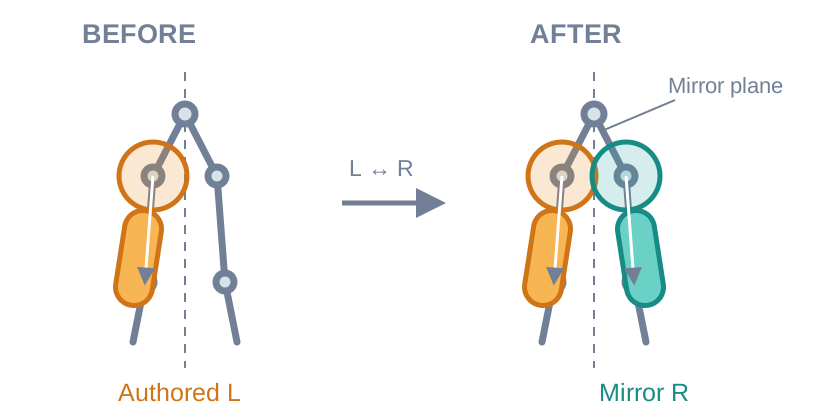
Collision mirroring uses a MirrorDataTable's bone mapping and the reference pose to generate counterparts from one authored side. It helps artists tuning characters that need matching left/right collisions. An intentionally different, hand-tuned opposite side can be preserved.
Configuring Mirror Data Table for Collision
Use a MirrorDataTable configured with the target Skeleton left/right bone mappings and Mirror Axis.
- Select the intended Kawaii Physics node.
- Assign the table to
Collision > Mirror Data Table for Collision. - Keep the option that skips bones with existing collisions enabled.
- Compile the Animation Blueprint.
- Play the motion.
Shape Adjustment and Existing Collision
Adjust the original radius, size, position, or rotation offset while checking the generated side. Deriving the counterpart from the original settings reduces repeated manual edits. Generated shapes are not added and saved into the source asset.
If the opposite side needs a different shape, author it manually and keep the default skip option. Skipping is per shape type: an existing Sphere suppresses another Sphere, but does not also suppress a Capsule.
Settings and Generation Conditions
| Setting | Condition or behavior |
|---|---|
Mirror Data Table for Collision | Uses the target Skeleton's left/right mappings and MirrorAxis |
bSkipMirroredBoneWithExistingCollision | Defaults to true; skips a mapped target with a non-Mirror shape of the same type |
| Authored shape | Configure its Driving Bone, shape, and position/rotation offsets |
| No generation | No table, MirrorAxis None, no Skeleton information, no valid mapping, or a bone mapped to itself |
Offsets and Existing Shapes
Position and rotation offsets are converted into the opposite bone's local space using component-space reference-pose bone rotations. This is more than replacing bone names or flipping one offset coordinate.
Skipping checks whether the target bone already has a non-Mirror collision of the same shape type. A manually authored Sphere prevents generating another Sphere there; it does not also suppress Capsules. Shapes need not have identical positions or radii for this check. Setting the option to false permits generation alongside manual shapes, which can cause duplicate push-out.
Generated shapes have Source Type set to Mirror. Previous Mirror-sourced shapes are removed before regeneration. This operation does not write the generated opposite-side shapes back into the source asset.
Supported Shapes and Tapered Capsule
For Tapered Capsules, Radius0 belongs to the +Z endpoint and Radius1 to the −Z endpoint. If the generated rotation reverses endpoint meaning, mirroring swaps the radii to keep the thickness associated with the original physical endpoints.
The implementation generates Sphere, Capsule, Tapered Capsule, Box, and Plane shapes. This setting does not arbitrarily mirror gathered Simple World Collision shapes or Convex shapes.
Official Release Collision Setup · v1.22 Preview Overview
Related UE documentation
- Mirroring Animation — Create a Mirror Data Table and inspect paired bones and Mirror Axis; KawaiiPhysics uses the table for collision generation. (UE 5.8)