Quick Start
Get started with KawaiiPhysics in 5 minutes.
Prerequisites
- KawaiiPhysics is installed
- A character with Skeletal Mesh
- Animation Blueprint
Basic Setup
Step 1: Open Animation Blueprint
Open the Animation Blueprint of the character you want to apply physics to.
Step 2: Add KawaiiPhysics Node
Right-click in AnimGraph and add the Kawaii Physics node.
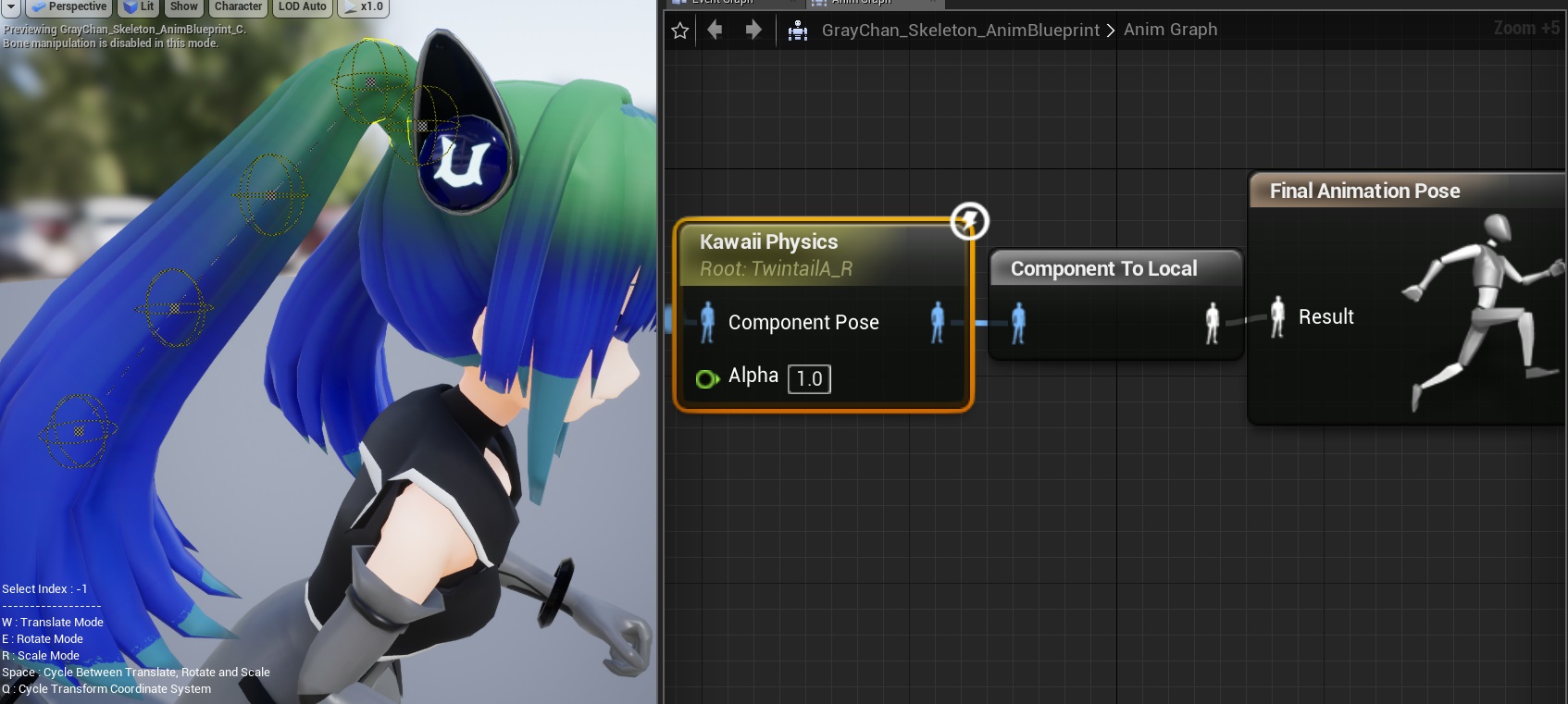
Step 3: Set Root Bone
- Select the KawaiiPhysics node
- Set Root Bone to the parent bone of the bone chain you want physics applied to
tip
For example, if you want to animate hair, set the Root Bone to the bone at the base of the hair (like head).
Step 4: Adjust Parameters
Basic parameters:
| Parameter | Description | Recommended Value |
|---|---|---|
| Damping | Damping (speed of motion convergence) | 0.1 - 0.3 |
| Stiffness | Stiffness (restoration force to original shape) | 0.05 - 0.2 |
| World Damping Location | Position damping in world coordinates | 0.5 - 0.8 |
Step 5: Preview

Move the character in the Animation Blueprint preview window to verify the physics behavior.
Next Steps
- Basic Concepts - Understand the mechanics
- Parameter Reference - Detailed parameter settings
- Collision Setup - Prevent body penetration