Wind Scope
This feature has not been officially released yet. It is planned for KawaiiPhysics v1.22. Specifications may change during development.
Overview
You want hair to drift gently, but the wind changes strength too rapidly. Repeatedly changing Procedural Wind values and playing the scene may not make the responsible component obvious.
Wind Scope plots individual wind components and their combined result. You can compare intervals first, then adjust strength separately. It gives artists and TAs a way to connect parameter values with the appearance they are tuning.
Preview and Live
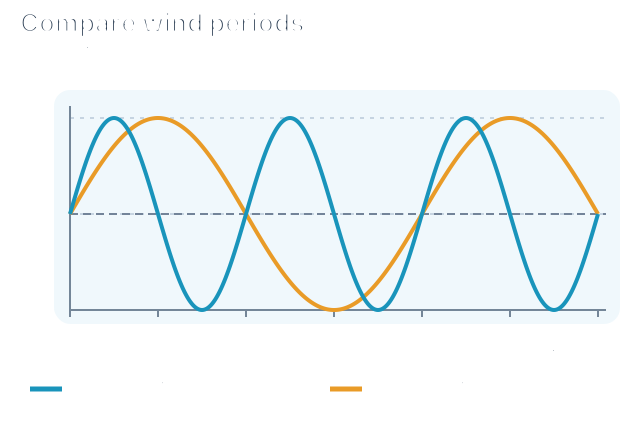
A higher peak means a larger wind value. A longer interval between peaks means strength changes more slowly. The example keeps strength the same and compares periods of 2 and 4 seconds.
Waveform Sampling Scope
| Mode | Data |
|---|---|
| Preview | Calculated from copied editor settings when no live target resolves |
| Live | Runtime-node samples including applied dynamic updates |
Components are Constant, Sway, Ripple, Strength Cycle, Random, Gust, and Total. Window selects the display span and Pause freezes it. Hovering a preset overlays its comparison Total waveform.
Both modes use LengthRate=0 root samples. They do not show tip phase, per-bone projection, or positions after collision. With a live target but no new samples, the display is retained; a stopped graph does not by itself mean Preview mode or zero wind.
Opening Wind Scope
- Select the target Kawaii Physics node in the Animation Blueprint.
- Open
Wind Scopein Details. - Choose the wind in
Force. - Set
Windowto show a few cycles. - Freeze the waveform with
Pause.
Opening and Shared-Source Resolution
Open from Details Wind Scope or the node context menu Wind Scope (Force [n]). Verify the external-force index in Force. Shared Publisher Shared Wind is supported too.
A shared-wind consumer may redirect to its publisher. Check the target and tag in the banner; Show local wind / Open publisher distinguish local values from the source. On a redirected consumer, shared-parameter edits, preset application, and Paste are restricted; open the publisher to edit.
Editing, Clipboard, and Test Gusts
Edits modify editor-node values and request dynamic updates when a live target resolves. Undo transactions are used, but the operation changes the ABP.
| Action | Effect |
|---|---|
| Copy | Copy current Procedural Wind settings to the clipboard |
| Paste | Apply compatible data to the node and request a live update if available |
| Test Gust | Send one test gust using Strength / Rise / Decay to the live target, without changing authored wind parameters |
With no live target, Test Gust reports a skip. Shared wind routes through the publisher. See transient forces for gameplay handle management.
Preset Application and Saving
Clicking a Presets entry applies the eleven ToDynamicParams() fields and sets Enabled=true and TimeScale=1. Normal runtime ApplyProceduralWindPreset preserves those two values, so its scope differs.
Assign a custom asset in Project Settings > Plugins > Kawaii Physics under Wind Preset Data Asset (internal name WindScopePresetDataAsset). Built-ins are Breeze / Strong / Storm.
| Action | Result |
|---|---|
| Save as Preset > Add New Preset | Append current values as Custom n, without PresetTag |
| Save as Preset > Overwrite | Replace an entry while keeping its saved name and tag |
| Reload | Reload entries from the assigned DataAsset |
Saving modifies the DataAsset and marks it dirty. Without a storage asset, saving is unavailable and the menu links to Project Settings. Assign a valid PresetTag before selecting a new entry through gameplay APIs. If the list changed while working, Reload before choosing an overwrite target. Wind presets do not replace whole-node settings or bone assignments. See wind presets for stored fields and runtime conditions.
Related UE documentation
- Data Assets — Review data stored in assets and instances of existing Data Asset classes. (UE 5.8)